
Let's face it: Residential HVAC comfort consultants have a lot to remember when compiling a proposal for a homeowner. In the crush of peak season, when appointments are backed up, "stuff" happens. If you want to hit your profit margin targets, you must account for every part and labor hour precisely. That's a difficult task for the following reasons:
- Visiting customers' homes can involve many noisy distractions that make it hard to gather all the details needed for an accurate proposal.
- Many variables affect an accurate quote, and sometimes a few missed details later impact the job's profitability. It can be the cost of a part or the labor of a part run.
- If you have more than one rep, they may gather quote information differently, making some jobs more profitable than others.
What if you could automate the routine tasks your comfort consultants typically handle? Install Manager Pro ensures that your sales team never misses a beat, or any pertinent detail, when it comes to quoting a job. It's like having an experienced install manager on-site for every proposal, ensuring the most complete, accurate data possible.
Simply put, manual quoting relies too much on memory and varies too much from quote to quote and team member to team member.
How do you prevent job rollovers, part runs, and callbacks? How do you ensure an accurate labor hour estimate for every job quoted? How do you manage risk effectively? Consider three areas where Install Manager Pro helps you get it right the first time and protect your company's profits:
1. Accurate bill of materials
Challenge: The bill of materials lists every component you need to complete a new HVAC installation. But what happens if your consultant forgets to include a part when compiling the HVAC proposal? Here's how one missing part can trigger an unfortunate chain of events:
- Parts/equipment not billed to the customer: Since the customer has already agreed to the estimate, you are responsible for covering the cost of the parts not included in the proposal.
- Lower price: Forgetting to add in the price of that part lowers your average ticket.
- Part run: If you don't discover the missing part until your crew is working, you may have to do a part run, adding extra labor.
- Job rollover: Leaving the job site for an extended period disrupts your crew's productivity and could lead to job rollover (unscheduled time the next day).
- Callback: If your team rushes to finish the job the next day, the system could be installed incorrectly and require a callback for repairs. How much can a callback cost you? Each time you send a service tech out for a callback, you lose hundreds of dollars in revenue—the cost of the time he or she could have spent on a profitable job.
These inaccuracies and delays are especially problematic during the busy season when your team works as quickly as possible to get everything done on time and within budget. It's the worst time to make mistakes because they are more likely to lead to expensive delays and dissatisfied customers.
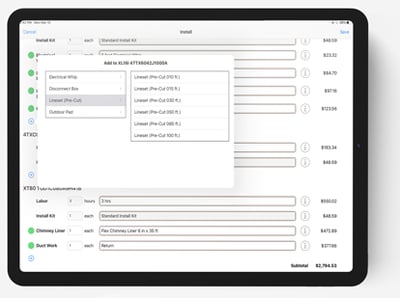 Solution: Based on the type of equipment installed, Install Manager Pro features the following item categories in the bill of materials:
- Mandatory (required) items: These are the must-have items your HVAC installation requires. For example, for a new AC system, you need to install a line set for the AC coil. Install Manager Pro will automatically populate this based on the minimum and maximum length and price specifications you set. Your consultant can then adjust the specifications as needed during the sales call.
- Recommended items: These are items that you should have but aren't always necessary. For example, with a new AC unit, it's recommended that you include a new concrete pad or foundation. This will automatically be included in the bill of materials unless your consultant deselects it because the homeowner chooses to reuse the old pad.
- Optional items: Some items are optional on most installations but necessary in certain situations. For example, you need a condensate pump when condensate cannot drain by gravity.
This three-tiered bill of materials takes the burden of remembering every detail off your busy sales team by providing an accurate, immediate checklist at the point of sale. The app does the remembering; your comfort consultant still makes the calls, removing a recommended item the homeowner doesn't need or swapping a pad for a wall mount, so the list carries their judgment as well as your rules.
2. Accurate labor hour estimate
Challenge: Your installation crew may be used to working long days during the busy season. But if you don't estimate your labor hours accurately, their 10-hour workday may quickly spill over into an additional day. Unscheduled rollovers can quickly push your schedule back, cut into profits, frustrate customers, and erode employee morale.
Hoping to win the sale, your comfort consultant may be overly optimistic about how long the job will take, thinking it will take only one day. If your crew rushes to finish in one day, it can lead to mistakes and callbacks.
Solution: Install Manager Pro calculates accurate labor hour estimates based on the items selected in your bill of materials. It replaces guesswork and optimism in quoting with real-world estimates of how long each task really takes. It assigns labor hours to each item, letting you specify the level of detail needed to calculate the correct labor hours. For example, you can specify line-set labor according to the length of the line set. The longer the line set, the more installation work it requires.
Making these labor predictions early and accurately allows you to plan jobs better. For example, if you know a job will take 11 hours, you can ask the customer ahead of time whether the crew can start early or stay late. You may also have the opportunity to send a more experienced crew to get the job done faster. Implementing these strategies will help you prevent job rollovers and callbacks.
A related setting covers the other end of the problem: a job sold with six hours of labor still costs you a crew's full day. With day rate labor turned on, the app adds a Day Rate Labor Adjustment to cover the leftover fraction of the day, as a cost adjustment rather than extra hours. The Help Center explains how day rate labor works.
3. Reliable risk management
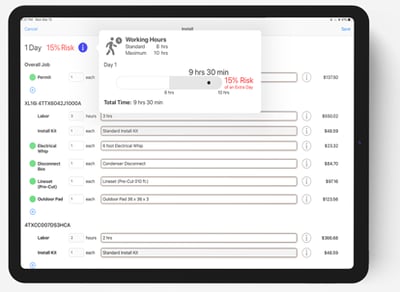 Challenge: When planning HVAC installations, it can be difficult to predict the likelihood of rollovers, part runs, and callbacks—especially when complex tasks are involved. What if the job requires extensive ductwork or major electrical rework? How much time will it really take to complete the job? How can you predict if the work is likely to roll into a second day?
Solution: Sales Builder Pro is the only sales tool that rates the risk of a rollover on each job. Install Manager Pro assigns a risk level to the labor-hour estimate for each item in your bill of materials, as well as any additional labor tasks.
Less predictable tasks carry more risk. For example, if your crew will need to deal with ladders and multilevel installs, the labor hours will carry more risk than if the work was scheduled for a single-level home.
Install Manager Pro provides contractors with a set of risk defaults to start with. Over time, contractors can add to and improve these default risk values. When they identify areas of increased risk on the job, they can add these areas to the module. This drives continuous process improvement during installations while building better collaboration and feedback between your sales and installation teams.
Improved professionalism and confidence
Install Manager Pro automatically builds a checklist for everything your comfort consultant needs to build a proposal accurately and efficiently. Arming your sales team with this information increases their knowledge and confidence when talking with customers and answering their questions. For example, the tool can quickly indicate that a consultant should start negotiating extra time for the job on the spot. This boosts your staff's and company's professionalism, leading to more wins.
One of the biggest complaints that people have about contractors is that they struggle to get the work done on schedule. Install Manager Pro ensures tasks are completed on time and flags when a job may roll over. On-time work leads to better customer reviews. Better consumer reviews bring in more leads.
Cost savings
Install Manager Pro's exceptional accuracy and efficiency yield significant cost savings. For example, consider how long it takes to draft an HVAC proposal. Install Manager Pro's automated process saves comfort consultants an hour preparing a single estimate. That lets your sales team spend more time prospecting and visiting new customers, essential activities for driving new business.
Accurate bill of materials and labor hour estimates can save you money by minimizing part runs, job rollovers, and callbacks.
One customer's experience:
"Install Manager Pro has taken out one week per month of work, increasing the efficiency of our Comfort Consultants by 25%. We work more efficiently because this tool has reduced the amount of time and effort involved in creating proposals and office processing for our sales and installation teams."
Rob West, S&L Prime A/C & Heating Systems, Glen Arm, MD
The alternative: the Materials tab
For unitary and boilers, Install Manager Pro takes a few hours of setup time with us. Plus some upkeep as your kits change. But it builds your experience into the app: mandatory (required), recommended, and optional items by equipment type, labor hours per item, and risk-rated estimates. That is the choice for owners handing sales off to employees, so a new hire and a twenty-year veteran quote the same way.
If you want to go live faster, every package includes the tried-and-true alternative: a materials list (Enhancement > Materials in the app). For example, consider an AC or HP. The outdoor unit needs a whip, a disconnect box, a line set, and a pad, about $400 of materials. Most contractors price that as one Install Kit in their pricing rules, because some jobs run $350 and some $450, and it averages out. Then they list the four parts on the Materials tab at $0, not as a giveaway but because the cost is already covered, so the crew sees exactly what goes on the truck. A furnace gets its own kit: PVC vent kit, condensate drain, drain pan, whatever is standard for you. Anything needed on some jobs but not others, such as a condensate pump, goes on the Materials tab with a price. We can start you with more than a dozen default items, or you can send us a spreadsheet of exactly what you quote.
Many contractors run this way for years. If you want the app to build the list, hours, and risk for you, full Install Manager Pro is the best option.
Included with Ductless Design Tools. Optional for unitary and boilers.
Install Manager Pro is part of Sales Builder Pro, our HVAC proposal software, and it comes in two ways.
- Ductless. Because ductless is quoted less often and is far more complex, we build it into Ductless Design Tools for supported ductless brands.
- Furnaces, air conditioners, air handlers, heat pumps, and boilers. For more routine, often simpler jobs, the Materials tab is a good option. If you want the app to build the list, hours, and estimated rollover risk for you, then Install Manager Pro is the best option.
Want to learn more? Request a demo to see Install Manager Pro in action.

John W. Steidley
John is the Founder and CEO of Intelligent Mobile Support, the company behind Sales Builder Pro. A father of three, he gets his biggest kicks from helping and watching his kids, employees, and contractors grow.