
Most HVAC replacements are unplanned, and only a few homeowners have budgeted for a new system. At the kitchen table, the monthly payment is every bit as important as the total investment. The question is not simply whether financing is available. It is whether the consultant shows an estimated monthly payment on every proposal and makes discussing it normal.
Why does financing decide so many HVAC sales?
Because nobody wakes up wanting to buy a furnace. A homeowner who can see a monthly payment next to the total can decide at the table. A homeowner who sees only the total often needs to “think about it,” and a share of those never call back.
At one Sales Builder Pro customer, two comfort consultants worked the same market, used the same price book, sold the same products, and received incoming calls on a pure rotation. Over twelve months, one meaningful difference emerged: how often each consultant offered financing.
Put the results on a 100-call basis, and the difference is easy to see:
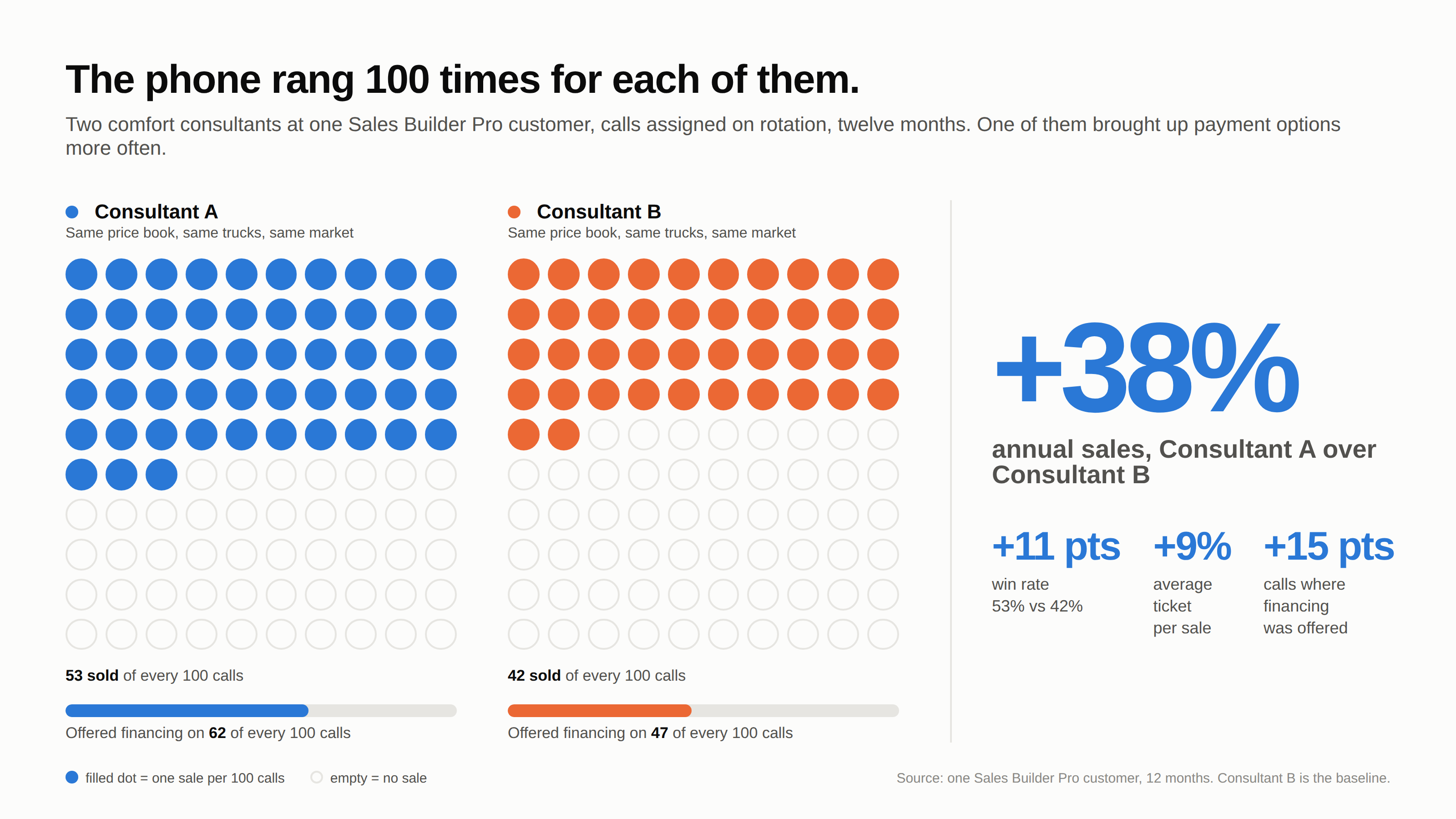
That 15-point difference in financing offer rate, one better habit, coincided with an 11-point lift in win rate and a 9% larger average ticket. The result was approximately 38% more annual sales.
Which financing programs work with Sales Builder Pro?
Most of them. Sales Builder Pro is not tied to any one lender. There are no lock-ins and no lock-outs. If a program publishes a payment factor, it works in the app, whether it comes from a national program such as Wells Fargo or Synchrony, a regional bank or credit union, a manufacturer’s promotional program, or a leasing company. Leasing plans work the same way when the lessor publishes a payment factor.
You keep the lender relationships you already have. Nothing changes about your approvals, funding, or dealer agreements.
How do you set a financing plan up?
Once, in the Management Portal, in a few minutes per plan. For each program you enter:
- A program name your team will recognize.
- The payment factor from the lender’s rate sheet.
- A payment label the homeowner will see, such as “60 months, no interest” or “No prepayment penalty.”
- A disclaimer. A sensible default is provided (“Estimate, approval required. Payment terms are determined by your selected financial partner.”), and you can adjust it to match your lender’s language.
Drag and drop the plans into the order you want them to appear on the tablet. You can even select plans that you want the app to preselect, so your preferred program is the one the homeowner sees first. From that point on, every proposal shows the calculated monthly payment for every option automatically, with no math at the table.
For setup instructions, visit the Sales Builder Pro Help Center, including guidance for handling dealer fees.
What does the homeowner see?
Only the specific plans the consultant recommends for comparison. Next to each option’s total investment, the homeowner sees the available payment plans with the monthly payment for each. The consultant can mark one plan as the recommendation and let the homeowner compare it against the others, or switch the whole proposal between cash price and financed.
The point of the view is that nothing is hidden. The total investment stays on the screen whenever there is a purchase price, and the payment sits beside it. A homeowner can judge affordability and cost at the same time, which builds trust.
Where should your lender’s application link live?
In two places, and both are already in your hands.
In the presentation. Add your lender’s pre-approval or application page as a link in the Financing section of your presentation, alongside the lender’s brochure and explainer video. When the money conversation opens, the consultant can turn the tablet around and the homeowner can apply on the lender’s own page, on the tablet or on their own phone. Your Financing section is part of the digital brag book, and it is one of the highest-value assets you can include: Building a Great Digital Brag Book.
In the eSign Toolkit. For families that decide after the visit, the eSign Toolkit sends a personalized shopping cart the homeowner can review at home. Put the same application link there. The think-it-over buyer can compare options, pick a payment plan, apply, and sign, all in one sitting, without a second visit. Details on how the Toolkit works: eSign Toolkit product overview.
Sending the homeowner to the lender’s page has a second benefit. Their personal and credit information goes directly to the lender and never passes through your team, your notes, or your proposal.
Five habits to standardize with your team
The Comfort Consultant Success Manual treats financing as a payment choice, not a closing trick. Five practices worth making standard:
- Open the money conversation with a neutral question. “Would you prefer to pay for this all at once, or would you like to review payment options?” Every answer is a fine answer.
- Show the total and the payment together. The payment makes affordability concrete; the total makes cost clear.
- Explain the tradeoff plainly. A longer term lowers the payment and usually raises the total paid. A shorter term does the reverse. Neither is right or wrong. It is a homeowner preference.
- Help the homeowner apply when needed. Explain the next step, ask before submitting anything, and walk them through the lender’s page. Never promise approval, and never write credit details into proposal notes.
- Describe programs only as the lender’s approved terms allow. A no-prepayment-penalty plan is flexible; it is not free. Say what the terms say. Work with your finance company to get the wording right.
What to do this week
Pull up your Management Portal and check five things:
- Every finance or leasing program you offer is set up with a current payment factor.
- Your preferred programs are set as defaults.
- Your lender’s application link appears in both your presentation’s Financing section and your eSign Toolkit.
- Your blended financing fees are correctly factored into your margins.
- Then ask each consultant what share of their calls included a payment option last month.
If the answer is under half, the numbers above show what is on the line. Recommending and comparing finance plans helps your customers afford what they need, helps your company sell more, and helps your Comfort Consultants get a pay raise.
See Sales Builder Pro in action
Make financing a normal, transparent part of every sales conversation. Schedule a Demo to see how Sales Builder Pro presents cash prices and monthly payments side by side.

John W. Steidley
John is the Founder and CEO of Intelligent Mobile Support, the company behind Sales Builder Pro. A father of three, he gets his biggest kicks from helping and watching his kids, employees, and contractors grow.